
• Published: November 2026
• 12 min read
GitHub Copilot Playbook: Agents, MCP, Tools, and Skills
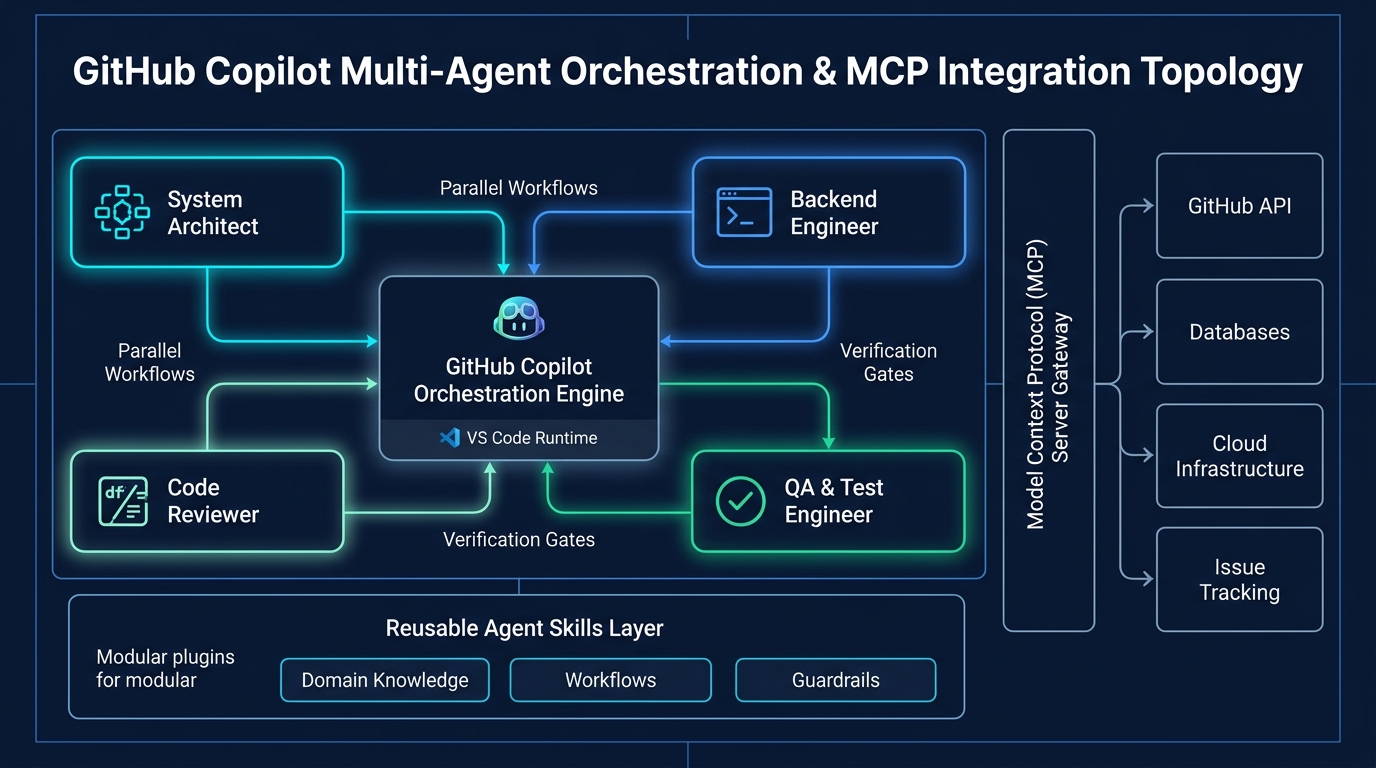
GitHub Copilot Multi-Agent Orchestration & MCP Integration Topology
Executive Summary & Key Takeaways
- Distinct Architectural Layers: Assign custom agents for role-based reasoning, MCP servers for system connectivity, tools for execution, and skills for reusable workflow patterns.
- Token Efficiency & Context Hygiene: Keep repository instructions concise and partition tasks into isolated context windows to eliminate token bloat and preserve model focus.
- Deterministic Tooling & MCP Governance: Standardize external integrations through MCP servers with strict JSON schemas and least-privilege credentials rather than loose prompts.
- Hybrid Orchestration Topology: Combine parallel sub-agents for exploratory research with sequential execution pipelines for state-modifying actions and quality gates.
- Verification by Design: Decouple authoring from validation by requiring independent reviewer agents, automated linters, and test suites before committing changes.
1. Executive Summary & The 4-Layer Mental Model
Effective AI-assisted software engineering in GitHub Copilot requires moving beyond generic prompts into a disciplined, layered system architecture. High-performing engineering teams organize their developer workflows around four complementary capabilities: Custom Instructions, Custom Agents, Agent Skills, and Model Context Protocol (MCP) servers.
Core principle: Keep shared instructions short, give each agent one clear responsibility, select models intentionally, and use MCP as the standard integration layer for connected tools and systems.
In one sentence: Use custom agents for role-based reasoning, MCP servers for access to external systems and structured capabilities, tools for concrete actions, and skills for reusable guidance and workflow patterns.
Figure 1.1: Request Workflow & External System Interaction
End-to-end orchestration flow: Skills frame tasks for Custom Agents, which execute Tools and interface with External Systems via MCP Servers.Custom Instructions vs. Custom Agents vs. Agent Skills vs. MCP Servers
| Feature | Custom Instructions |
|---|---|
| Mental Model | The Passive Guardrails “How we write code here.” |
| Typical Location | Repo-wide: .github/copilot-instructions.md Path-specific: .github/instructions/*.instructions.md Global: ~/.copilot/copilot-instructions.md |
| Loading & Triggering | Automatic & Silent (Always On). Injected automatically into Copilot's context window. Path-specific files activate using a YAML applyTo pattern. |
| Structure & Composition | Unstructured, standard markdown files with headings and lists. Path-specific files include basic YAML headers to define directory targets. |
| Context & Scope | Shares the default global chat session. Directly influences all base-level code completions and chats. |
| Token Consumption | Low but constant. Instructions are always added to context, so keep them concise and broadly useful. |
| Best Used For | Code style guides, testing conventions, and general architectural standards, for example 'Use TypeScript strict mode' or 'Prefer functional components.' |
2. Decision Framework & Capability Boundaries
Understanding when to create a shared rule, when to build a specialist agent, and when to expose an external tool via MCP is crucial for scalable developer operations. A well-designed Copilot workspace keeps common instructions minimal and relies on specialist abstractions for domain-specific work.
These capabilities are complementary rather than interchangeable. High-velocity engineering workflows intentionally combine all four layers to deliver consistent, verifiable results.
Decision Framework: Default Choices & Exceptions
| Decision | Default Choice | Use a Different Choice When... |
|---|---|---|
| Shared instructions | .github/copilot-instructions.md | Guidance applies only to one specialist agent, one skill, one path, or one narrow workflow. |
| Agent count | 3-6 focused agents | An existing agent cannot stay focused or needs different tools, model guidance, or output expectations. |
| Reusable workflow guidance | Skill | The content is live data, a one-off prompt, or a system integration. |
| Tool integration | MCP server | No MCP option exists and a narrow direct tool is safer or more practical. |
| Documentation style | Short bullets and repeatable templates | A complex edge case needs a short example to remove ambiguity. |
What Each Capability Does: Purpose, Ideal Use & Anti-Patterns
| Capability | Primary Purpose | Best Used For | Avoid Using It For |
|---|---|---|---|
| Custom agents | Specialized task delegation | Breaking complex work into focused expert roles such as planner, coder, reviewer, or tester | Direct system integration when an external interface is required |
| MCP servers | Standardized access to external context and operations | Connecting Copilot to files, services, APIs, databases, tickets, docs, or custom enterprise systems | Storing general writing guidance or prompting style rules |
| Tools | Performing specific actions | Searching code, reading files, running commands, calling functions, or retrieving targeted data | High-level orchestration or broad behavioral policy |
| Skills | Reusable instructions and working patterns | Encoding preferred approaches such as debugging flows, code review checklists, migration playbooks, or repo conventions | Replacing live data access or executing actions by themselves |
3. Repository Instruction Strategy (.github/copilot-instructions.md)
A shared .github/copilot-instructions.md file keeps model behavior consistent across agents and developer sessions. Treat it as the repository's common operating manual, not an exhaustive dumping ground for workflow-specific details.
Include only stable, essential information: application purpose, primary tech stack and package managers, key architectural boundaries and service contracts, and development validation commands (run, test, lint, format). Explicitly specify protected paths that agents must never modify without human confirmation (such as generated protobufs, vendor files, or database migration histories).
Structure instruction files with compact sections: Do, Do Not, Workflow, and Output. Remove repeated guidance that belongs in specialist agents or skill files, and prune instructions after major architecture transitions.
4. Intentional Model Selection Strategy
Rely on 'Auto' for routine coding and scaffolding to reduce token consumption and maintain low interaction latency. Switch to specialized models intentionally when task complexity demands distinct cognitive strengths.
The matrix below outlines the recommended model tier across the standard engineering workload taxonomy.
Model Selection Matrix by Workload
| Task Area | Typical Work | Model Guidance |
|---|---|---|
| General lookup and MCP usage | Work item lookup, Confluence or Azure DevOps content, internal systems through MCP, web research, and general knowledge questions | Use faster, lower-cost models where accuracy is sufficient. |
| Code generation and scaffolding | Boilerplate, UI layouts, ORM queries, APIs, configuration files, and scripts | Use code-specialized models for repetitive implementation work. |
| Testing and quality assurance | Unit tests, integration tests, boundary cases, and realistic mock data | Use stronger reasoning models when test design is complex. |
| Debugging, refactoring, and migration | Terminal errors, exceptions, legacy code restructuring, performance improvements, and framework or language migrations | Use deeper reasoning models for diagnosis and careful change planning. |
| Documentation and administration | Explanations, comments, JSDoc, PyDoc, markdown docs, pull request descriptions, and commit messages | Use faster models unless the content requires deep technical synthesis. |
5. Specialist Custom Agents & Modular Guardrail Architecture
Avoid the temptation of creating a single 'super-agent' that attempts to plan, code, test, review, and document simultaneously. Instead, maintain a tight roster of 3 to 6 focused specialist agents with clear role boundaries and limited toolsets.
Author custom agent files using a modular guardrail pattern: metadata frontmatter, single-sentence role statement, references to shared repository instructions, explicit prerequisite inputs, Do/Do Not guardrails, tool-bound workflows, and a structured output contract requiring summaries of changes, risks, assumptions, and validation outputs.
Specialist Custom Agent Starter Roles
| Agent Role | Primary Responsibility | Typical Tools |
|---|---|---|
| Architect | Defines architecture, creates diagrams, plans implementation, and decomposes complex work into clear phases. | Repository search, diagramming tools, planning docs, and architecture decision records |
| Backend Engineer | Builds and maintains APIs, data access, schema design, and database migrations. | File edit tools, test runner, database tools, migration tooling, and API clients |
| Frontend Engineer | Builds TypeScript React experiences using routing, state management, and component libraries. | File edit tools, package manager, frontend test runner, browser/devtools, and design references |
| DevOps Engineer | Maintains automation, infrastructure scripts, CI/CD pipelines, and configuration workflows. | Terminal, Azure DevOps, cloud CLIs, Ansible, Vault, and CI/CD configuration |
| CloudOps Engineer | Operates cloud services, containers, and runtime deployments with a focus on reliability and observability. | Cloud CLI/console tools, container tooling, deployment platforms, logs, and monitoring dashboards |
// Sample Custom Agent Definition: .github/agents/backend-engineer.agent.md---
name: Backend Engineer
description: Builds and maintains APIs, data access, and schema migrations.
tools:
  - codebase
  - terminal
  - mcp__database__*
---
## Role
You are a Staff Backend Engineer specialized in REST/gRPC API implementations and database migrations.

## Shared Instructions
Follow all architectural conventions defined in `.github/copilot-instructions.md`.

## Do / Do Not Guardrails
- DO run automated test suites before reporting task completion.
- DO NOT modify frontend templates or infrastructure configurations outside `src/server` and `src/database`.

## Structured Output Contract
- Changes Made: Concise bulleted list of modified files.
- Risks & Assumptions: Data migration caveats or contract breaking changes.
- Validation: Exact test commands executed with pass/fail output.
6. The Model Context Protocol (MCP) Layer & Enterprise Governance
While native tools provide direct workspace execution (reading files, executing local scripts, running linters), MCP servers provide a governed, standardized abstraction over external enterprise systems. By decoupling tool execution from model reasoning, organizations prevent prompt injection and maintain centralized security auditing.
When authoring custom MCP servers, always write logging to stderr rather than stdout—writing unformatted diagnostic logs to stdout corrupts the JSON-RPC framing protocol and causes chat initialization failures. Inject secrets and credentials via environment variables or secret vaults rather than embedding tokens.
Design MCP tools to be deterministic and safe by default: validate all input parameters against strict JSON schemas, enforce rate limits on broad queries, and require human confirmation gates before executing destructive modifications.
// Sample Enterprise MCP Configuration: .github/mcp.json{
  "mcpServers": {
    "github": {
      "command": "npx",
      "args": ["-y", "@modelcontextprotocol/server-github"],
      "env": {
        "GITHUB_PERSONAL_ACCESS_TOKEN": "env:GH_PAT"
      }
    },
    "database-inspector": {
      "command": "docker",
      "args": ["run", "-i", "--rm", "mcp/postgres-query:latest"],
      "env": {
        "DATABASE_URL": "env:READONLY_REPLICA_URL"
      }
    }
  }
}
7. Reference Collaboration Architectures & Anti-Patterns
Pattern A: Code Change with Review. A coding skill establishes testing and style rules; a planner agent scopes the affected files; an implementer agent writes the code; test tools execute validation; and an independent reviewer agent audits the result against the initial skill criteria.
Pattern B: Debugging with External Context. A debugging skill provides a structured triage rubric; a debugger agent isolates the symptom; local tools inspect stack traces; an MCP server retrieves recent CI telemetry or ticket context; and the agent formulates a verified remediation.
Pattern C: Documentation & Implementation Alignment. A documentation skill defines formatting guidelines; a researcher agent gathers codebase context; an MCP server pulls architectural decision records; and a writer agent drafts publication-ready documentation.
Common Anti-Patterns to Avoid: Using skills as static data stores (skills guide behavior, not dynamic state); overloading a single agent with all tasks; building monolithic multi-purpose tools; hiding integration logic in ad-hoc prompt templates; and skipping automated verification passes.
Figure 7.1: Multi-Agent Collaboration Reference Patterns
Architectural topology for Pattern A (Code Change with Review), Pattern B (Debugging with External Context), and Pattern C (Documentation Alignment), illustrating the interaction between Skills, Custom Agents, Tools, and MCP Servers.8. Pipeline and Sub-Agent Orchestration: Sequential vs. Parallel
Distinguish between execution topology (pipelines) and worker abstractions (sub-agents). Pipelines dictate the workflow execution graph (sequential, DAG, or branched) across task stages. Sub-agents provide isolated context windows and role-specific toolsets spawned by a lead orchestrator.
Sequential Execution is essential when Stage N strictly depends on Stage N-1 outputs (e.g., ticket ingestion → triage → patch → pull request) or when mutating state (file writes, schema updates) where race conditions cannot be tolerated. Latency is additive, but state remains deterministic.
Parallel Execution excels for read-heavy, partitionable workloads such as multi-source research, log parsing across multiple services, or parallel vulnerability evaluations. Concurrency reduces latency, but requires defensive merging to prevent merge collisions.
Beware orchestration pitfalls: The Fan-in Context Tsunami (parallel sub-agents returning lengthy prose that overwhelms the orchestrator's context window), Invocation Quality Drift (sub-agents drifting without human correction), and Rate-Limit Spikes (bursting concurrent calls against model quota limits).
The Recommended Enterprise Pattern: Fan out in parallel for independent research and evaluation, enforce strict, concise summary schemas on all worker outputs, then fan in to a sequential synthesis and validation stage before taking state-changing actions.
Core Concepts: Execution Topology vs. Worker Abstraction
| Architecture Element | Role & Structure | Context & State Behavior | Primary Use Case |
|---|---|---|---|
| Pipeline | The workflow topology, such as sequential, DAG, or branched, that dictates task handoffs. | State transitions sequentially across stages or through shared memory graphs. | Multi-stage workflows with clear validation checkpoints. |
| Sub-agent | An isolated worker spawned by a lead orchestrator with a distinct prompt and toolset. | Runs within its own context window, preventing context bloat in the main session. | Deep exploration, domain specialization, and compression. |
Sequential vs. Parallel Execution Topology Trade-offs
| Dimension | Sequential Execution | Parallel Execution |
|---|---|---|
| Execution flow | Stage N begins only after Stage N-1 produces final output. | Multiple agents run concurrently, and results are joined through a merge stage. |
| Latency | Additive: total time is the sum of each stage, which can create a throughput bottleneck. | Bounded by the slowest branch plus synthesis or merge time. |
| Context & state | Carries intermediate state forward step by step. | Keeps contexts isolated until the fan-in or synthesis step. |
| Failure modes | Cascading failure: one faulty step can halt or corrupt the downstream chain. | Incomplete fan-in: dropped branches, merge collisions, or contradictory findings. |
| API / compute impact | Predictable, steady token and request-rate consumption. | High concurrency bursts that can trigger API rate limits. |
9. Token Efficiency, Operational Discipline & Best Practices Checklist
Token-efficient agent systems are faster, more cost-effective, and far less prone to context drift during extended pairing sessions. Implement .copilotignore files to exclude human-only onboarding documentation or heavy build artifacts from indexing.
Keep open IDE editor tabs to an absolute minimum: open tabs are automatically pulled into Copilot's working context window, consuming tokens and diluting model focus. Start fresh chat sessions for unrelated tasks to prevent stale conversation history from polluting reasoning loops.
Steer running agents early if their trajectory drifts—early human course-correction costs significantly fewer tokens than rolling back a completed erroneous change.
Summary Checklist: Maintain short repository-wide instructions, assign each custom agent a single distinct role, use MCP for governed external access, enforce explicit handoffs between planner and implementer, and validate all changes with automated test runners before completion.